
Lords Exchange App — Bet Live From Your Home Screen With a Free 2 MB Install
Four taps in Android Chrome or iPhone Safari put the Lords Exchange app on your home screen as an Install App shortcut of about 2 MB. Nothing arrives as an APK. The icon opens the five lobby tabs on the ID and wallet you already hold.
Add the Lords Exchange App Icon in 4 Taps
Lords Exchange App Sign In: Two Fields on the Icon, Then a Quick 4-Digit Code
Once the icon sits on your home screen, this is the first form it opens. Type the User ID the desk issued, then the password. A 4-digit validation code shown beside the form is the third and last field, and the whole Lords Exchange login takes about 35 seconds.
Nothing new to remember. Same ID, same wallet.
Direct answer
Lords Exchange App Download: a Free Install App Shortcut of About 2 MB
Lords Exchange app download means adding the lobby to your home screen, nothing more. Open the lobby in Chrome on Android or in Safari on iPhone, use Install App, and an icon of about 2 MB appears after four taps. No APK, no store listing, no second account.
- 4taps from lobby to icon
- 2 MBroughly, on the phone
- 0APK files involved
- 2browsers: Chrome, Safari
Lords Exchange App on Android Chrome: Four Easy Taps
Sign in before or after, it makes no difference to the install. What matters is the browser. It has to be Chrome itself and not the small browser window that pops up when you tap a link inside a chat app, because that window has no install option at all.
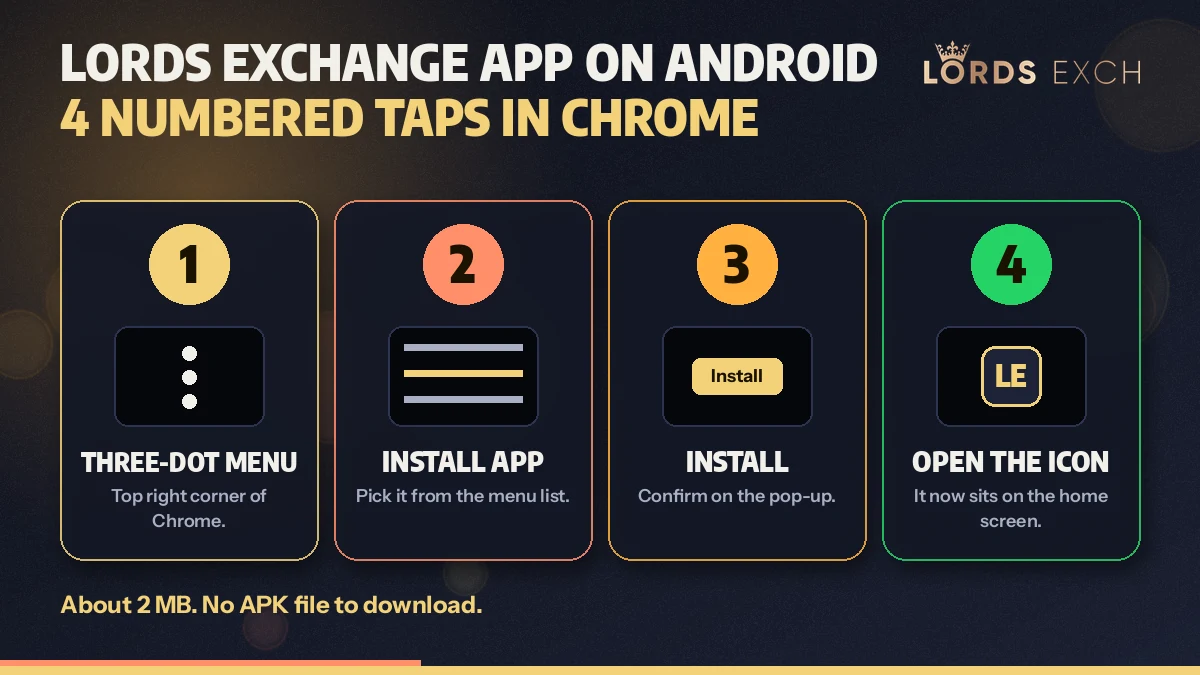
- Tap the three-dot Chrome menu at the top right while the Lords Exchange lobby is open on screen.
- Tap Install App in that list. On some phones Chrome words it Add to Home screen; it does the same job.
- Tap Install on the confirmation card that names Lords Exchange and shows its icon.
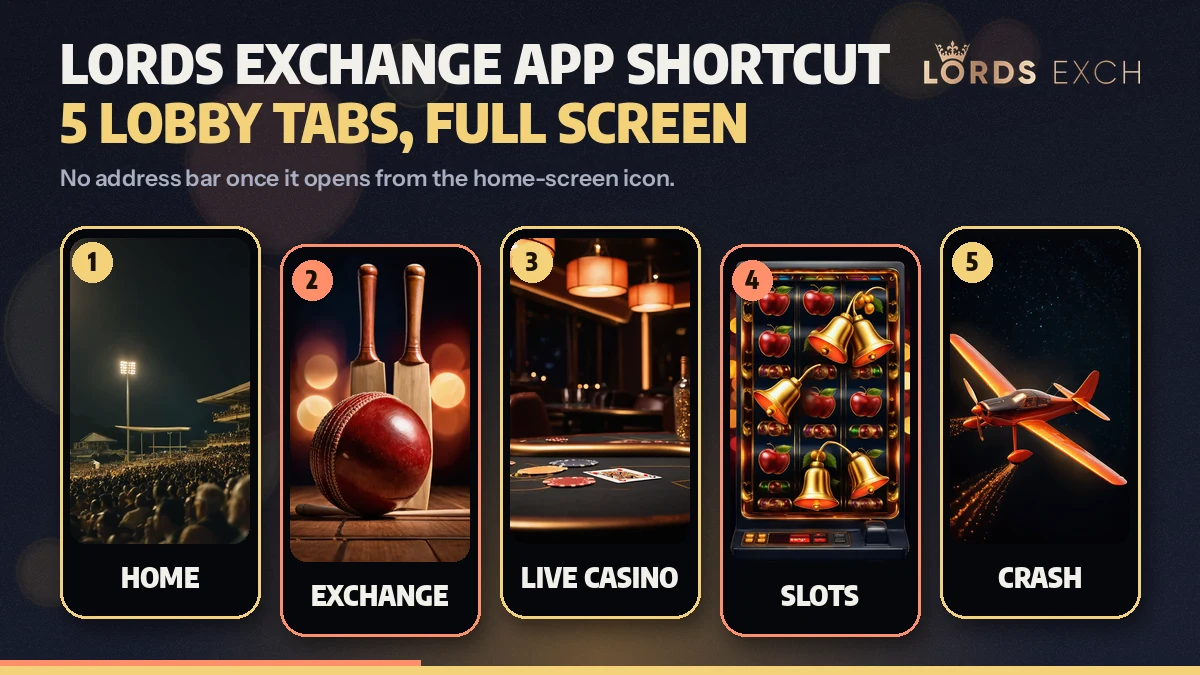
- Tap the new icon on your home screen. The lobby opens full screen with its five tabs: Home, Exchange, Live Casino, Slots and Crash.
That is the whole Lords Exchange app install on Android. No file lands in your Downloads folder, and the phone never asks you to allow installs from an outside source, which is how you can tell a browser shortcut from an APK.
Lords Exchange App on iPhone Safari: the Quick Share Sheet Route
Apple shows no Install App line, so on an iPhone the Lords Exchange app goes through the share sheet instead. Different labels, same result.
- Share
- First tap, made in the Safari toolbar while the Lords Exchange lobby is on screen.
- Add to Home Screen
- Second tap. This line is the iPhone stand-in for Install App, so the 2 MB Lords Exchange shortcut gets created here.
- Add
- Third tap. It confirms the Lords Exchange label that will sit under the icon.
- The icon
- Fourth tap. Safari's toolbar is gone and the User ID form is waiting.
It should be Safari. Open the address in another iPhone browser and the Add to Home Screen line may be missing, or it may save a plain bookmark that still opens inside a tab.
Start With ₹500 on the Lords Exchange AppWhat the Free Lords Exchange App Shortcut Does and Does Not Do
People expect more from the word app then a 2 MB shortcut can give, and sometimes less. So here is the split.
Takes the whole displayThe five Lords Exchange tabs run edge to edge, with the bottom bar sitting where your thumb already is.
Keeps one ID, one walletThe balance you see on the icon is the balance in the browser. There is nothing to transfer between them.
Updates itselfEach launch loads the current lobby from the server, so there is never an update file to fetch.
Does not create an accountThe shortcut has no sign-up screen. It expects an ID that already exists.
Does not hold moneyDeleting the icon deletes about 2 MB. Your wallet stays on the Lords Exchange account.
Does not follow a new addressThe icon remembers the address it was saved from and no other.
One more limit, and it is an obvious one once said: the Lords Exchange app needs a connection. Odds and tables are live, so with no signal the icon opens to a blank or a retry screen rather than a saved copy of the lobby.
Lords Exchange App Icon Versus a Browser Tab: Four Real Differences
Both open the same lobby. In practice the gap is about how quickly you get back in during a match, not about features.
| Point | Install App icon | Browser tab |
|---|---|---|
| How you reach it | One tap on the home screen | Open the browser, find the tab or type the address again |
| Screen space | Full screen, no address bar | Address bar and toolbar stay above the lobby |
| Space on the phone | About 2 MB | Nothing beyond the normal browser cache |
| ID and wallet | Same Lords Exchange ID and balance | Same Lords Exchange ID and balance |
If you only open Lords Exchange now and again, the tab is fine. The icon earns its place when you are in and out again and again through an evening.
Lords Exchange APK Download Searches and the Real Install App Answer
Lords Exchange app, typed as a search, has a two-megabyte reply: an icon that Chrome or Safari builds out of the lobby in four taps, with Home, Exchange, Live Casino, Slots and Crash sitting behind it. So a Lords Exchange app download happens inside the browser menu. It costs nothing, and it finishes when the User ID form fills the display on the wallet you were already using.
A Lords Exchange APK download is a different request, and the answer is short. The lobby does not publish a Lords Exchange APK, so there is no .apk file to fetch, approve or update. Anyone who wants the app-style experience gets it from the Install App line instead, and the result behaves the way an installed Lords Exchange app would: one tap to open, no address bar, the same five tabs.
Lordsexch App Spellings That Reach the Same Free Icon
- Lord Exchange app, typed without the s, is the same shortcut and the same lobby.
- Lordsexch app is the short spelling taken from the address; the install steps do not change.
- Lords Exchange app download and Lords Exchange APK download both end at Install App, never at a file.
- Lords Exchange APK as a single search has one reply: the desk sends an address, not an attachment.
Lords Exchange APK Files Offered Elsewhere Are Not the Official Lobby
Search for the APK and you will find pages with a download button. None of those files comes from the lobby, because the Lords Exchange lobby has never shipped one; its only app is the shortcut your own browser builds.
So a file carrying this name was packaged by somebody else, and it will ask for a User ID and password on a screen the desk does not run. Skip it. If a chat contact sends you an .apk and calls it the Lords Exchange app, ask for the lobby address instead.
Re-adding the Lords Exchange App Icon Fast When an Address Changes
The icon is tied to the the address it was created from, and Lords Exchange runs several of those because Indian networks block betting domains now and then. Say you added it from lordsexch.now. Should that address stop opening on your connection, the icon stops with it and shows the browser's error page full screen.
The fix is a remove and a re-add. Long-press the old icon and pick the remove option, open a working address in Chrome or Safari (the Lordsexch Now address page carries the dated test result), then repeat the four taps. Your Lords Exchange ID, password and balance are untouched by any of this, since none of them ever lived in the icon.
Install App Missing? Quick Lords Exchange App Fixes by Symptom
- No Install App line
- The page is probably open inside a chat app's built-in browser. Use its Open in Chrome option, then look in the menu again.
- Line is greyed or absent in a private tab
- Incognito and Private tabs usually hide it. Open the Lords Exchange address in a normal tab.
- Menu says Open app instead
- The shortcut is already installed. Check the app drawer, not just the home screen.
- iPhone sheet lacks the line
- The Lords Exchange address is open outside Safari. Paste it into Safari and tap Share from there.
- Icon opens to an error page
- The saved address is not loading on your network. Remove the icon and re-add it from a working Lords Exchange address.
- Icon opens but sign in fails
- That is an account matter, not an app one. Five wrong tries lock the ID for 30 minutes; the login page covers resets.
A Real Lords Exchange App Install, Minutes Before a T20
Here is how it tends to go on the desk chat. Someone messages during the toss asking for the APK link because the first over is close. The reply is the lobby address and one line: open it in Chrome, menu, Install App. Shortly after comes a screenshot of the home screen with the icon on it, followed (almost always) by a second question about why the file is not in Downloads. There is no file. Its a shortcut, and that is the point.
From there the Lords Exchange app behaves like the browser did. The Exchange tab lists the match, a T20 carries 50+ markets, and the minimum stake is ₹100; the Lords Exchange cricket page explains match odds, bookmaker, fancy and session in detail. Tap out to answer a call, tap the icon again, and you are back on the same screen without typing an address.
Lordsexch App Searches That Lead to the Same Free Shortcut
- lords exchange app
- lord exchange app
- lordsexch app
- lords exchange app download
- lords exchange apk download
- lords exchange apk
- lords exch app
- lordsexch id
- lords exch login
Lords Exchange App Next Steps: Fast Login, ID, Address and Cricket Pages
Lords Exchange App Questions With Quick Answers on Install, iPhone and Size
How do I download the Lords Exchange app on Android?
Open the Lords Exchange lobby in Chrome, tap the three-dot menu, tap Install App, confirm with Install, then tap the new icon on your home screen. That is four taps and about 2 MB. There is nothing to fetch from a store and no file to approve in your phone settings.
Is there a Lords Exchange APK file I can download?
No, the lobby does not publish an APK. The only Lords Exchange app is the Install App shortcut created by your own browser, so nothing with an .apk ending comes from the desk. A file offered under this name on another website was packaged by someone else and should be skipped.
Does the Lords Exchange app work on an iPhone?
Yes, through Safari. Open the lobby address, tap Share, choose Add to Home Screen, tap Add, and the icon lands beside your other apps. It opens full screen and asks for the same User ID, password and 4-digit validation code that the Android icon and the browser tab ask for.
How much space does the Lords Exchange app take?
About 2 MB. The shortcut stores an icon and a small shell of the lobby, while odds, tables and your balance load from the account each time you open it. Removing the icon frees that space at once and does not touch your ID or the money in your wallet.
Why is Install App not showing for Lords Exchange on my phone?
Usually because the page is open in the wrong browser. Install App appears in Chrome on Android, and Add to Home Screen appears in Safari on iPhone; a link opened inside a chat app or a private tab often hides both. Reopen the address in the main browser and check the menu again.
Do I use the same ID inside the Lords Exchange app?
Yes, one ID works everywhere. The icon, the browser tab and every Lords Exchange address open the same account, so the User ID, password and wallet balance match on all of them. A bet placed from the icon shows in the tab a moment later, and a withdrawal request does too.